Did you actually read last month's parcel invoice? I don't mean glancing at the total before hitting "pay." I mean opening the line-item detail and reading every surcharge, one by one.
In 2023 I helped a home-goods seller in the City of Industry reconcile their shipping spend. They moved around 4,000 parcels a month on UPS, invoiced well into six figures. After reading the detail I asked the owner one question: "Do you ship to business addresses?" "Sure, plenty," he said. "Then why did more than a hundred parcels to commercial addresses all get hit with a residential surcharge?" He went quiet. That one line item had cost him a couple thousand dollars that month — and he'd been paying invoices like it for nearly a year.
Parcel invoices aren't like other vendor bills: the carrier grades its own homework — it calculates the charges and collects them, and if you never audit, it never volunteers a refund. Across UPS and FedEx invoices, the same three surcharges cause the most trouble. Learn them once, then build a process around them.
Residential Surcharge: Is That Delivery Address Really a Home?
The residential surcharge is simple enough: delivering to a home costs the carrier more than delivering to a warehouse dock, so each residential parcel carries a few extra dollars (check the carrier's site for current rates — they change). The problem is who decides an address is residential: the carrier's address database, not reality.
I've seen the database get it wrong plenty of times. A small business inside a commercial park flagged as residential. An office on the second floor of a strip mall flagged as residential. The worst one: a 3PL in Ontario shipping replenishment to a major warehouse in Los Angeles — a clearly commercial facility — billed at the residential rate anyway. Stale address data, a new development missing from the database, or your address formatted differently from how it's stored can all flip the flag.
How to catch it:
- In UPS Billing Center, download the invoice detail and filter on the Residential Surcharge field; in FedEx's invoice, find the corresponding surcharge line. Export, filter, and every overcharged parcel shows up at once.
- Match the billed addresses against your own customer address book. Commercial addresses, warehouses, retail stores — if any got the surcharge, that's an error.
- Disputes generally carry a window of around 60 days from the invoice date (confirm current policy — once it expires, the money is gone). Evidence is easy: a lease, a business license, or the company's own website showing the address.
Of the three, this is the dumbest money on the table. The address is what it is, disputes win at a high rate — don't let it sit in your invoice collecting dust.
Address Correction Fees: The Address Was Right — So Why the Fee?
An address correction fee is what the carrier charges for "fixing" your address: its system decided something was wrong, the driver delivered to the "corrected" address, and your invoice gained a line item — in the teens of dollars per parcel (check current rates on the carrier's site). Sometimes the correction genuinely saves the parcel — a customer transposed two digits in the street number. But a good share of these fees is pure waste.
The most absurd one I saw: the customer had written "Suite 210" perfectly clearly. UPS's own system scrambled it, ran the parcel to the wrong spot, "corrected" it back, and charged the fee anyway. Another common pattern: your label says "Ste 210" while the database holds "Suite 210." The machine reads that as incomplete, a human touches it, and the fee appears. If the carrier's system laid a finger on your address — rightly or wrongly — you pay first and argue later.
How to catch it:
- Find the Address Correction entries in your invoice detail and look at each "corrected" address the carrier claims.
- Put the original address next to the corrected one. If they describe the same place, just formatted differently, that fee is disputable.
- Prevent it: run every address through the carrier's own validation tool before printing the label, and write floor, unit, and suite numbers in full. Don't save those three letters.
My judgment: address corrections are the most patience-testing of the three because you compare them one by one. And that's exactly why most sellers never look — the carrier is betting you don't have the time.
DIM Weight Disputes: Do Your Measurements Match the Carrier's Scanners?
Everyone in the business knows dimensional weight: length × width × height divided by 139 — the standard domestic divisor both UPS and FedEx use — and the carrier bills whichever is greater, actual or dimensional. The fight isn't over the formula. It's over who measured.
In your warehouse, someone measured with a tape or a dimensioner, and the box sat square. But inside the carrier's sort facility, an automated scanner on the conveyor does the measuring — and a box that's slightly crushed, a flap of tape sticking up, or an odd angle on the belt routinely adds an inch or two to each dimension. An inch sounds like nothing, but DIM math is multiplication: one or two extra pounds per parcel, easily. At parcel rates, a seller moving a few thousand parcels a month can overpay enough in a year to buy a forklift.
How to catch it:
- Compare billed weight against your system's billable weight, with extra attention on DIM-related lines. Export the carrier's scanned dimensions and build a variance table against your warehouse measurements.
- If the variance leans one way over time — the carrier always measures bigger — that's a systematic bias, not bad luck.
- How to dispute: keep evidence — dimensioner logs, photos taken at pack-out. File within the dispute window; single-parcel amounts are small, but batch disputes win at a decent rate.
One caution: DIM disputes pay off in volume, not per parcel. If DIM-related charges look outsized on your invoice, pull the data before accepting it.
Pulling It All Out of the Invoice, Step by Step
Here's a monthly routine you can actually use:
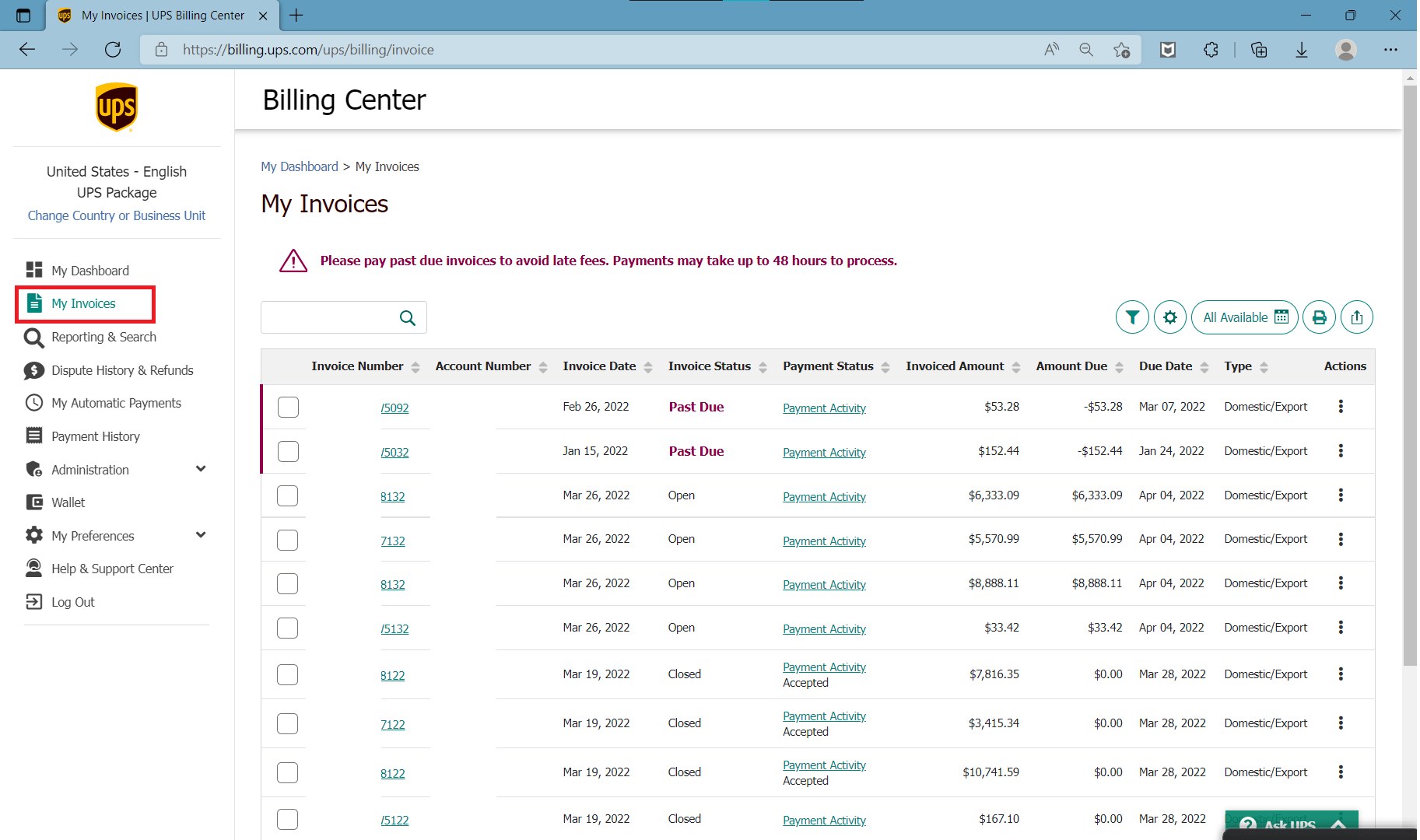
- At the start of each month, export last month's detail from UPS Billing Center (Invoice Detail) and the CSV from FedEx. If you use both carriers, check both — don't audit one and trust the other.
- Summarize surcharges by type — Residential Surcharge, Address Correction, DIM-related lines — and look at the totals and shares first, so you know the scale.
- Residential: filter every parcel that got the surcharge and match against your address book. Commercial addresses flagged = errors.
- Address corrections: read each "before and after" pair. Same place, different formatting = disputable.
- DIM: compare billed weight with your own dimension data. Systematic over-measurement = disputable.
My commentary: the first run takes an hour or two; after that, thirty minutes a month. The number you find the first time is usually the scariest, because you've never looked before.
Disputes, Deadlines, and What a Year of Auditing Recovers
Two hard rules on disputes. First, the window is generally around 60 days from the invoice date (verify current policy) — expired money is gone; old invoices don't come back. Second, the more specific your evidence, the higher your win rate: proof-of-address documents for address items, dimension logs for DIM.
Filing is straightforward: UPS through the dispute channel in Billing Center or your account rep; FedEx through a similar flow on the invoice page. Then follow up until the refund lands — credits usually show up on the next invoice, so don't file and forget.
How often, and who does it? My rule of thumb: over 3,000 parcels a month, audit monthly; 1,000–3,000, quarterly; under 1,000, a casual look twice a year is fine. A warehouse supervisor or someone in finance can own it part-time; if nobody has bandwidth, third-party audit firms work on a share-of-recovery model — no recovery, no fee.
What does a year of this recover? A sense of scale: at 3,000–5,000 parcels a month, I've seen mid-size sellers claw back one to two tens of thousands of dollars a year; sellers with messy address mixes and lots of box sizes recover more. My verdict: if you ship more than 3,000 parcels a month and still don't audit your invoices, you're handing the carrier a monthly donation. That money was your margin.
Do These Three Things This Week
First, open UPS Billing Center (or your FedEx invoice), export last month's detail, filter on the three fields above, and add up the overcharges. Write the number down. Second, rank flagged parcels by how close their 60-day windows are to expiring — dispute those first, and don't let good money die on a deadline. Third, set a calendar reminder — thirty minutes at the start of every month — or put this routine on your warehouse supervisor's monthly checklist.
Invoice auditing isn't advanced technology. It's getting your own money back. Spend an hour this week — next month's invoice might make you smile.